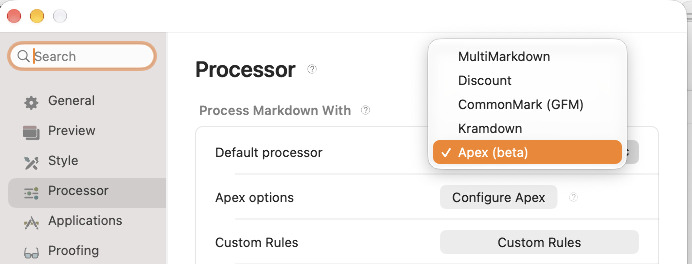
I’ve been working on Apex for a while: a unified Markdown processor that pulls together the good parts of CommonMark, GFM, MultiMarkdown, Kramdown, and Marked itself. With Marked 3.2.6, Apex lands in the app as a built-in processor (beta), so you can try that whole stack without leaving the preview.
The latest version is out now for Paddle customers. There was a bit of a hiccup with the build that went out last night, so if you’ve found yourself unable to launch Marked to check for updates, download the Free Trial from the website (your registration will already be in place). For MAS and Setapp users, the update is in review and should be available soon.
Why another processor?
Markdown flavors keep splitting. Pick MultiMarkdown for citations and you lose something else. Pick GFM for task lists and you’re fighting table quirks from another tool. Apex’s goal is simpler: one converter that can speak those dialects, and a Unified mode that turns on the useful bits together.
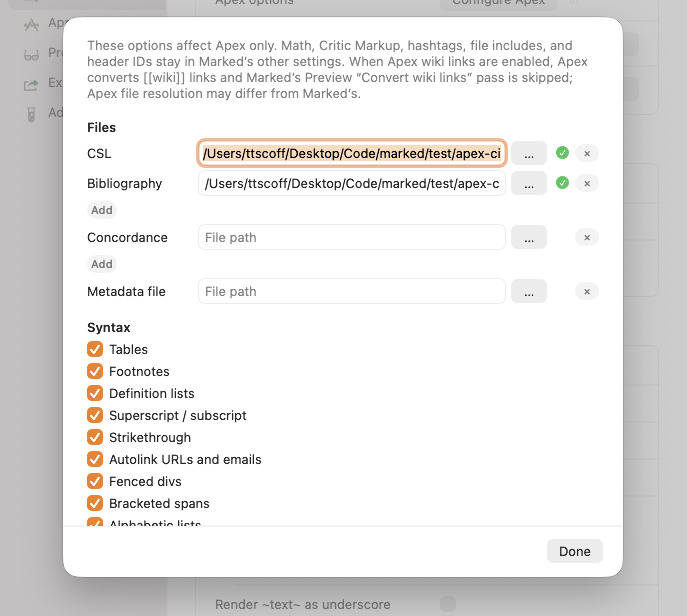
In Marked, choose Apex from the processor menu, then open Configure Apex for the optional syntax toggles (tables, footnotes, wiki links, indexes, and more). There’s also a Configure Apex Files group for CSL styles, bibliography files, concordance, and metadata paths, with browse buttons and sandbox checkmarks so Marked can actually reach those files.
Normalizing syntax
A lot of day-to-day Markdown pain is inconsistency: three footnote styles, two attribute list dialects, tables that “almost” parse depending on which processor wrote them. Apex leans into that mess on purpose.
It accepts multiple citation and footnote syntaxes, Kramdown- and Pandoc-style attributes, wiki links, callouts, definition lists, and the usual GFM extras. The point isn’t to invent yet another dialect. It’s to stop punishing you for having files that grew up in different tools.
I eventually intend to replace all of the built-in processors with just Apex, as it will cover the vast majority of the reasons you might pick any one processor. It will include a mode selector so you can narrow down to just one feature set (CommonMark, Kramdown, etc.) for compatibility with other tools. It will reduce a lot of my customer support by Just Working™ with whatever flavor your document is written in.
Citations, CSL, and bibliography
Apex brings real citation support into Marked’s built-in path. Point it at BibTeX, CSL JSON, or CSL YAML bibliographies, pick a CSL style, and use Pandoc-style [@key], MultiMarkdown [#key], or mmark-style cites. The bibliography can generate from what you actually cite, and you can keep those paths in document metadata or in the Apex Files sheet so each project stays self-contained.
Indices and relaxed tables
If you write book-ish or academic Markdown, indices matter. Apex can build them with the TextIndex / mmark-style tooling you’ve seen in the CLI, and Marked surfaces that through the Apex prefs instead of a separate pipeline.
Tables get the same “be less brittle” treatment. Alongside normal GFM tables you get relaxed tables (Kramdown-style tables without a rigid separator row), headerless tables, grid tables, colspan/rowspan helpers, and captions. Fewer hand-edits just to make a grid render. Speaking of grids, there’s even optional support for Pandoc-style grid tables.
Other Apex bits worth knowing
There’s more under the hood than the Settings sheet can show in one glance:
Compatibility modes: CommonMark, GFM, MultiMarkdown, Kramdown, and Unified
Includes and multi-file combine / merge workflows
Automatic TOC markers (<!--TOC-->, ``, and friends)
Inline attribute lists, bracketed spans, and fenced divs
Smart typography, emoji shortcodes, task lists, and math delimiters that play nicer with Marked’s preview
It’s still marked beta in the app for a reason. I’m shipping it so people can lean on it early, not because every edge case is done.
Paginated PDF, finally less haunted
Separately — and honestly this ate a lot of the same release cycle — paginated PDF export got a major pass.
If you’ve been fighting Swiss-cheese mid-page holes, headings parked halfway down a page, lists that jump as a single block, blank trailing sheets, or footer lines being cut off: that was the target. The print engine is revamped, packing is tighter, long paragraphs and lists fill the remaining page and split at the cut, continuation table headers repeat cleanly, and a pile of same-page hole / footer-straddle bugs are gone.
Continuous PDF got love too (full export width, fewer blank columns, no surprise blank bands from heading page breaks), but the big story for print workflows is pagination that stays dense without inventing empty pages.
Paginated PDFs in Marked 3 are a different beast than Marked 2. The system print engine that Marked 2 relied on crashes on modern OSs when you try to add headers and footers. So in Marked 3, it builds a hidden web view the size of the page dimensions, loads the document, then paginates it using JavaScript, scrolling through by page height to capture a vector PDF context of each page. This is much slower, and that sucks. But it does open the door for things like footnotes per page, which is something I’m working on next.
What’s new in 3.2.6
From the changelog, the highlights:
New
Apex (beta) as a built-in unified Markdown processor, with prefs / Dingus / Conductor support
Configure Apex sheet for syntax toggles
Configure Apex Files for CSL, bibliography, concordance, and metadata paths
Reading Mode section in Keyboard Shortcuts and the Help HUD
Native Mini Map overlay on the preview (scroll, bookmarks, Command-magnify)
Remove iA Writer annotations option in Processor settings
Choose a Marked Share library folder when publishing (nested folders and New Folder)
Improved
Medium-length documents paginate faster on the Step-9 burst path
Same-page list holes, long body paragraphs, H2 page starts, checklist tightness, and PDF bottom / blockquote clearance
Continuation table headers drawn per PDF slice
Long lists and paragraphs fill remaining space and split at the cut
Apex processor hardening (metadata files, TextIndex, table cells, long lines)
n / p jump bookmarks by document position
Save PDF can write immediately when page size, margins, title, and content are unchanged
Conductor processor actions no longer change the default processor mid-run
Reading-mode and document state use an on-demand bridge instead of idle WebView polling
Fixed
A long list of paginated PDF packing, footer-straddle, mid-page hole, orphan heading, and blank-page bugs (Swiss included)
PDF page numbers staying on a single X/X total
Table headers repeating without overlaying the first page
Continuous PDF blank columns, export width, and trailing blank sheets
Task list checkboxes from Apex showing an extra bullet
HTML comments colliding with math / TOC placeholders
<!--TOC--> filling when an H3 appears before the first H2
Mini Map restore / double-draw / failed-capture issues
Software Update stacking duplicate New version dialogs
Preview abort / crash when two documents process at once
Universal Apex.framework so Release/Archive no longer dies on missing _apex_* symbols
If you want the kitchen-sink list, it’s all in the app’s release notes and the online changelog. If you try the Apex processor, tell me where it still fights your files — that’s the fastest way to get Unified mode where it needs to be.